Workstations by OSD Method - Useful for reporting non-standard deployments.
Use RegKey2MOF to add a MOF for HKLM\Software\Microsoft\Deployment 4
SELECT b.Name0
,c.UniqueUserName
,b.Domain0
,d.Version0
,d.Caption0
,a.[TimeStamp]
,a.[DeploymentMethod0]
,a.[DeploymentSource0]
,a.[DeploymentTimestamp0]
,a.[DeploymentToolkitVersion0]
,a.[DeploymentType0]
,a.[OSDAdvertisementID0]
,a.[OSDPackageID0]
,a.[OSDProgramName0]
,a.[TaskSequenceID0]
,a.[TaskSequenceName0]
,a.[TaskSequenceVersion0]
FROM [CM_I01].[dbo].[v_GS_OSDInformation_OSDInfo_2_00] a
join v_GS_SYSTEM b on a.ResourceID=b.ResourceID
join v_UserMachineRelation c on a.ResourceID=c.MachineResourceID
join v_GS_OPERATING_SYSTEM d on a.ResourceID=d.ResourceID
where SystemRole0 = 'Workstation'
Friday, July 29, 2016

Monday, July 18, 2016
Powershell: List AD Group Members in Table and Export to CSV
Import-Module ActiveDirectory
$Groups = (Get-AdGroup -filter * | Where {$_.name -like "NAME*"})
$Table = @()
$Record = [ordered]@{
"Group Name" = ""
"Name" = ""
}
Foreach ($Group in $Groups)
{
$Arrayofmembers = Get-ADGroupMember -identity $Group | select name
foreach ($Member in $Arrayofmembers)
{
$Record."Group Name" = $Group
$Record."Name" = $Member.name
$objRecord = New-Object PSObject -property $Record
$Table += $objrecord
}
}
$Table | export-csv "C:\temp\SecurityGroups.csv" -NoTypeInformation
$Groups = (Get-AdGroup -filter * | Where {$_.name -like "NAME*"})
$Table = @()
$Record = [ordered]@{
"Group Name" = ""
"Name" = ""
}
Foreach ($Group in $Groups)
{
$Arrayofmembers = Get-ADGroupMember -identity $Group | select name
foreach ($Member in $Arrayofmembers)
{
$Record."Group Name" = $Group
$Record."Name" = $Member.name
$objRecord = New-Object PSObject -property $Record
$Table += $objrecord
}
}
$Table | export-csv "C:\temp\SecurityGroups.csv" -NoTypeInformation
Tuesday, June 21, 2016
Friday, June 03, 2016
OSD - Microsoft Surfaces
Found this. Lots of interesting Task Sequence customisations for Surface deployments, some of which are still relevant for Win 10 OSD.
http://download.microsoft.com/download/4/4/0/4407548E-ECE0-43C2-8EE1-13544CFC591B%2Fsurface-devices-in-the-enterprise-OS-deployment-with-SCCM-2012.pdf
http://download.microsoft.com/download/4/4/0/4407548E-ECE0-43C2-8EE1-13544CFC591B%2Fsurface-devices-in-the-enterprise-OS-deployment-with-SCCM-2012.pdf
SQL Query to Join Results via ResourceID
SELECT
a.[ResourceID],
a.FileName,
a.FileVersion,
a.FilePath,
b.Distinguished_Name0
FROM [CM_DBxx].[dbo].[v_GS_SoftwareFile] a
JOIN [CM_DBxx].[dbo].[v_R_System] b on a.[ResourceID]=b.[ResourceID]
WHERE a.FileName = 'application.exe'
or..get even more information
Select
sf.ResourceID,
sf. FilePath,
sf.FileVersion,
sf.CreationDate,
sf.FileCount,
sf.FileDescription,
sf.FileModifiedDate,
sf.FileSize,
sf.ProductId,
sf.ResourceID,
b.Name0,
b.Last_Logon_Timestamp0,
b.User_Name0,
b.Creation_Date0
from v_gs_softwarefile sf
join v_R_System b on sf.ResourceID=b.resourceID
where sf.FileName = 'acrord32.exe'
a.[ResourceID],
a.FileName,
a.FileVersion,
a.FilePath,
b.Distinguished_Name0
FROM [CM_DBxx].[dbo].[v_GS_SoftwareFile] a
JOIN [CM_DBxx].[dbo].[v_R_System] b on a.[ResourceID]=b.[ResourceID]
WHERE a.FileName = 'application.exe'
or..get even more information
Select
sf.ResourceID,
sf. FilePath,
sf.FileVersion,
sf.CreationDate,
sf.FileCount,
sf.FileDescription,
sf.FileModifiedDate,
sf.FileSize,
sf.ProductId,
sf.ResourceID,
b.Name0,
b.Last_Logon_Timestamp0,
b.User_Name0,
b.Creation_Date0
from v_gs_softwarefile sf
join v_R_System b on sf.ResourceID=b.resourceID
where sf.FileName = 'acrord32.exe'
Using Powershell and WinSCP to SFTP upload
There may be an occasion where you need to send your files somewhere using SFTP. Perhaps as an automated, scheduled task:
It is not necessary to install the full WinSCP application stack. The automation pack should be used for automation. Download WinSCP automation from .NET assembly / COM library on the https://winscp.net/eng/download.php page and place on the server.
This pack contains an executable and the DLL that interact with each other. Just put the DLL and EXE together.
[System.Reflection.Assembly]::LoadFrom('C:\PATH\WinSCPnet.dll')
Add-Type -Path "C:\PATH\WinSCPnet.dll"
$sessionOptions = New-Object WinSCP.SessionOptions
$sessionOptions.ParseUrl("sftp://USER:PASS@;fingerprint=FINGERPRINT@SFTP.SITE.COM")
$session = New-Object WinSCP.Session
$session.Open($sessionOptions)
$session.PutFiles("C:\PATHTOUPLOAD\[file.xyz] or [* for all]", "/[upload folder if necessary]/").Check()
$session.Dispose()
If you downloaded the files, make sure you unblock:

Now, simply configure your Scheduled Task. Don't forget to set the Security Options.


It is not necessary to install the full WinSCP application stack. The automation pack should be used for automation. Download WinSCP automation from .NET assembly / COM library on the https://winscp.net/eng/download.php page and place on the server.
This pack contains an executable and the DLL that interact with each other. Just put the DLL and EXE together.
Script:
[System.Reflection.Assembly]::LoadFrom('C:\PATH\WinSCPnet.dll')
Add-Type -Path "C:\PATH\WinSCPnet.dll"
$sessionOptions = New-Object WinSCP.SessionOptions
$sessionOptions.ParseUrl("sftp://USER:PASS@;fingerprint=FINGERPRINT@SFTP.SITE.COM")
$session = New-Object WinSCP.Session
$session.Open($sessionOptions)
$session.PutFiles("C:\PATHTOUPLOAD\[file.xyz] or [* for all]", "/[upload folder if necessary]/").Check()
$session.Dispose()
If you downloaded the files, make sure you unblock:


Program/Script: powershell.exe
Add arguments (optional): -ExecutionPolicy Bypass -File "C:\PathToYour\File.ps1"

Wednesday, May 25, 2016
SQL Query for Device Information
Lovely query for your Device information overview
SET NOCOUNT ON;
-- Declaration
--Devices
SELECT
COALESCE(Computer_System_DATA.Name0, '') AS DeviceName,
COALESCE(v_gS_operating_system.Caption0, '') + ' ' + COALESCE(v_gS_operating_system.CSDVersion0, '') + ' ' + COALESCE(v_gS_operating_system.Version0, '') AS OperatingSystem,
CASE
when v_gS_operating_system.Caption0 like '%server%' then 'Server'
when System_Enclosure_data.ChassisTypes0 = 1 then 'Other'
when System_Enclosure_data.ChassisTypes0 = 2 then 'Unknown'
when System_Enclosure_data.ChassisTypes0 = 3 then 'Desktop'
when System_Enclosure_data.ChassisTypes0 = 4 then 'Desktop'
when System_Enclosure_data.ChassisTypes0 = 5 then 'Desktop'
when System_Enclosure_data.ChassisTypes0 = 6 then 'Desktop'
when System_Enclosure_data.ChassisTypes0 = 7 then 'Desktop'
when System_Enclosure_data.ChassisTypes0 = 8 then 'Desktop'
when System_Enclosure_data.ChassisTypes0 = 9 then 'Laptop'
when System_Enclosure_data.ChassisTypes0 = 10 then 'Laptop'
when System_Enclosure_data.ChassisTypes0 = 11 then 'Hand Held'
when System_Enclosure_data.ChassisTypes0 = 12 then 'Docking Station'
when System_Enclosure_data.ChassisTypes0 = 13 then 'All in One'
when System_Enclosure_data.ChassisTypes0 = 14 then 'Sub Notebook'
when System_Enclosure_data.ChassisTypes0 = 15 then 'Space-Saving'
when System_Enclosure_data.ChassisTypes0 = 16 then 'Lunch Box'
when System_Enclosure_data.ChassisTypes0 = 17 then 'Main System Chassis'
when System_Enclosure_data.ChassisTypes0 = 18 then 'Expansion Chassis'
when System_Enclosure_data.ChassisTypes0 = 19 then 'SubChassis'
when System_Enclosure_data.ChassisTypes0 = 20 then 'Bus Expansion Chassis'
when System_Enclosure_data.ChassisTypes0 = 21 then 'Peripheral Chassis'
when System_Enclosure_data.ChassisTypes0 = 22 then 'Storage Chassis'
when System_Enclosure_data.ChassisTypes0 = 23 then 'Rack Mount Chassis'
when System_Enclosure_data.ChassisTypes0 = 24 then 'Sealed-Case PC'
end as
DeviceType,
'' as ServicePack,
coalesce(Network_DATA.IPAddress0,'') as IPAddress,
case
when System_Enclosure_DATA.SerialNumber0 like 'VMware%' then 'Virtual'
when Computer_System_DATA.Model0 like 'VMWare%' then 'Virtual'
when Computer_System_DATA.Manufacturer0 like 'VMWare%' then 'Virtual'
when System_Enclosure_DATA.SerialNumber0 is not null then 'Physical'
when Computer_System_DATA.Manufacturer0 is not null then 'Physical'
when System_Enclosure_DATA.Model0 is not null then 'Physical'
else null
end as PhysicalOrVirtual,
COALESCE(Computer_System_DATA.Manufacturer0, '') AS Make,
COALESCE(Computer_System_DATA.Model0, '') AS Model,
COALESCE(System_Enclosure_DATA.SerialNumber0, '') AS serial_number,
COALESCE(LTRIM(Processor_DATA.Name0), 'Unknown') AS CPUName,
COALESCE(cpus.cpu_count, '') AS NumberPhysicalCPUs,
sum(cpus.corecounts) as NumberLogicalCPUs,
COALESCE(PC_Memory_DATA.TotalPhysicalMemory0 / 1024, '') AS RAMinBytes,
RS.User_Name0 as LastLoggedOnUser,
WS.LastHWScan as LastSeenDate,
null as Environment,
null as PhysicalHost
FROM v_gs_Computer_System Computer_System_DATA
LEFT JOIN v_GS_NETWORK_ADAPTER_CONFIGUR Network_DATA
ON (Computer_System_DATA.Resourceid = Network_DATA.Resourceid AND Network_DATA.Index0 = 1)
LEFT JOIN v_gS_operating_system
ON (Computer_System_DATA.Resourceid = v_gS_operating_system.Resourceid
AND v_gS_operating_system.BootDevice0 like '\Device\HarddiskVolume%')
LEFT JOIN v_gs_Processor Processor_DATA
ON (Computer_System_DATA.Resourceid = Processor_DATA.Resourceid AND Processor_DATA.DeviceID0 = 'CPU0')
LEFT JOIN v_GS_X86_PC_MEMORY pc_memory_DATA
ON (Computer_System_DATA.Resourceid = PC_Memory_DATA.Resourceid)
LEFT JOIN v_gs_Disk disk_DATA
ON (Computer_System_DATA.Resourceid = Disk_DATA.Resourceid AND Disk_DATA.Index0 = 0)
LEFT JOIN v_gs_Video_Controller Video_Controller_DATA
ON (Computer_System_DATA.Resourceid = Video_Controller_DATA.Resourceid
AND Video_Controller_DATA.DeviceID0 = 'VideoController1')
LEFT JOIN v_gs_PC_BIOS PC_BIOS_DATA
ON (Computer_System_DATA.Resourceid = PC_BIOS_DATA.Resourceid)
LEFT JOIN (
SELECT ResourceID,
COUNT(*) AS cpu_count,
sum(numberofCores0) as corecounts
FROM v_gs_Processor
GROUP BY resourceID
) cpus ON (Computer_System_DATA.Resourceid = cpus.Resourceid)
LEFT JOIN v_gs_System_Enclosure System_Enclosure_data
ON (Computer_System_DATA.Resourceid = System_Enclosure_DATA.Resourceid AND System_Enclosure_DATA.GroupID = 1)
LEFT JOIN v_R_System_valid RS
ON (Computer_System_DATA.Resourceid = RS.ResourceID)
LEFT JOIN v_GS_WORKSTATION_STATUS WS
ON (RS.ResourceID = WS.ResourceID)
GROUP BY Computer_System_DATA.Resourceid,
COALESCE(Computer_System_DATA.Name0, ''),
Computer_System_DATA.UserName0,
Network_DATA.IPAddress0,
v_gS_operating_system.InstallDate0,
Processor_DATA.Name0,
Processor_DATA.NormSpeed0,
PC_Memory_DATA.TotalPhysicalMemory0,
Disk_DATA.Size0,
Video_Controller_DATA.Description0,
PC_BIOS_DATA.Description0,
System_Enclosure_DATA.ChassisTypes0,
v_gS_operating_system.Caption0,
v_gS_operating_system.organization0,
v_gS_operating_system.CSDVersion0,
v_gS_operating_system.Version0,
cpus.cpu_count,
System_Enclosure_DATA.SMBIOSAssetTag0,
Processor_DATA.DeviceID0,
Computer_System_DATA.Manufacturer0,
Computer_System_DATA.Model0,
System_Enclosure_DATA.SerialNumber0,
PC_BIOS_DATA.SerialNumber0,
WS.LastHWScan,
System_Enclosure_DATA.Model0,
RS.User_Name0
Lovely query for your Device information overview
SET NOCOUNT ON;
-- Declaration
--Devices
SELECT
COALESCE(Computer_System_DATA.Name0, '') AS DeviceName,
COALESCE(v_gS_operating_system.Caption0, '') + ' ' + COALESCE(v_gS_operating_system.CSDVersion0, '') + ' ' + COALESCE(v_gS_operating_system.Version0, '') AS OperatingSystem,
CASE
when v_gS_operating_system.Caption0 like '%server%' then 'Server'
when System_Enclosure_data.ChassisTypes0 = 1 then 'Other'
when System_Enclosure_data.ChassisTypes0 = 2 then 'Unknown'
when System_Enclosure_data.ChassisTypes0 = 3 then 'Desktop'
when System_Enclosure_data.ChassisTypes0 = 4 then 'Desktop'
when System_Enclosure_data.ChassisTypes0 = 5 then 'Desktop'
when System_Enclosure_data.ChassisTypes0 = 6 then 'Desktop'
when System_Enclosure_data.ChassisTypes0 = 7 then 'Desktop'
when System_Enclosure_data.ChassisTypes0 = 8 then 'Desktop'
when System_Enclosure_data.ChassisTypes0 = 9 then 'Laptop'
when System_Enclosure_data.ChassisTypes0 = 10 then 'Laptop'
when System_Enclosure_data.ChassisTypes0 = 11 then 'Hand Held'
when System_Enclosure_data.ChassisTypes0 = 12 then 'Docking Station'
when System_Enclosure_data.ChassisTypes0 = 13 then 'All in One'
when System_Enclosure_data.ChassisTypes0 = 14 then 'Sub Notebook'
when System_Enclosure_data.ChassisTypes0 = 15 then 'Space-Saving'
when System_Enclosure_data.ChassisTypes0 = 16 then 'Lunch Box'
when System_Enclosure_data.ChassisTypes0 = 17 then 'Main System Chassis'
when System_Enclosure_data.ChassisTypes0 = 18 then 'Expansion Chassis'
when System_Enclosure_data.ChassisTypes0 = 19 then 'SubChassis'
when System_Enclosure_data.ChassisTypes0 = 20 then 'Bus Expansion Chassis'
when System_Enclosure_data.ChassisTypes0 = 21 then 'Peripheral Chassis'
when System_Enclosure_data.ChassisTypes0 = 22 then 'Storage Chassis'
when System_Enclosure_data.ChassisTypes0 = 23 then 'Rack Mount Chassis'
when System_Enclosure_data.ChassisTypes0 = 24 then 'Sealed-Case PC'
end as
DeviceType,
'' as ServicePack,
coalesce(Network_DATA.IPAddress0,'') as IPAddress,
case
when System_Enclosure_DATA.SerialNumber0 like 'VMware%' then 'Virtual'
when Computer_System_DATA.Model0 like 'VMWare%' then 'Virtual'
when Computer_System_DATA.Manufacturer0 like 'VMWare%' then 'Virtual'
when System_Enclosure_DATA.SerialNumber0 is not null then 'Physical'
when Computer_System_DATA.Manufacturer0 is not null then 'Physical'
when System_Enclosure_DATA.Model0 is not null then 'Physical'
else null
end as PhysicalOrVirtual,
COALESCE(Computer_System_DATA.Manufacturer0, '') AS Make,
COALESCE(Computer_System_DATA.Model0, '') AS Model,
COALESCE(System_Enclosure_DATA.SerialNumber0, '') AS serial_number,
COALESCE(LTRIM(Processor_DATA.Name0), 'Unknown') AS CPUName,
COALESCE(cpus.cpu_count, '') AS NumberPhysicalCPUs,
sum(cpus.corecounts) as NumberLogicalCPUs,
COALESCE(PC_Memory_DATA.TotalPhysicalMemory0 / 1024, '') AS RAMinBytes,
RS.User_Name0 as LastLoggedOnUser,
WS.LastHWScan as LastSeenDate,
null as Environment,
null as PhysicalHost
FROM v_gs_Computer_System Computer_System_DATA
LEFT JOIN v_GS_NETWORK_ADAPTER_CONFIGUR Network_DATA
ON (Computer_System_DATA.Resourceid = Network_DATA.Resourceid AND Network_DATA.Index0 = 1)
LEFT JOIN v_gS_operating_system
ON (Computer_System_DATA.Resourceid = v_gS_operating_system.Resourceid
AND v_gS_operating_system.BootDevice0 like '\Device\HarddiskVolume%')
LEFT JOIN v_gs_Processor Processor_DATA
ON (Computer_System_DATA.Resourceid = Processor_DATA.Resourceid AND Processor_DATA.DeviceID0 = 'CPU0')
LEFT JOIN v_GS_X86_PC_MEMORY pc_memory_DATA
ON (Computer_System_DATA.Resourceid = PC_Memory_DATA.Resourceid)
LEFT JOIN v_gs_Disk disk_DATA
ON (Computer_System_DATA.Resourceid = Disk_DATA.Resourceid AND Disk_DATA.Index0 = 0)
LEFT JOIN v_gs_Video_Controller Video_Controller_DATA
ON (Computer_System_DATA.Resourceid = Video_Controller_DATA.Resourceid
AND Video_Controller_DATA.DeviceID0 = 'VideoController1')
LEFT JOIN v_gs_PC_BIOS PC_BIOS_DATA
ON (Computer_System_DATA.Resourceid = PC_BIOS_DATA.Resourceid)
LEFT JOIN (
SELECT ResourceID,
COUNT(*) AS cpu_count,
sum(numberofCores0) as corecounts
FROM v_gs_Processor
GROUP BY resourceID
) cpus ON (Computer_System_DATA.Resourceid = cpus.Resourceid)
LEFT JOIN v_gs_System_Enclosure System_Enclosure_data
ON (Computer_System_DATA.Resourceid = System_Enclosure_DATA.Resourceid AND System_Enclosure_DATA.GroupID = 1)
LEFT JOIN v_R_System_valid RS
ON (Computer_System_DATA.Resourceid = RS.ResourceID)
LEFT JOIN v_GS_WORKSTATION_STATUS WS
ON (RS.ResourceID = WS.ResourceID)
GROUP BY Computer_System_DATA.Resourceid,
COALESCE(Computer_System_DATA.Name0, ''),
Computer_System_DATA.UserName0,
Network_DATA.IPAddress0,
v_gS_operating_system.InstallDate0,
Processor_DATA.Name0,
Processor_DATA.NormSpeed0,
PC_Memory_DATA.TotalPhysicalMemory0,
Disk_DATA.Size0,
Video_Controller_DATA.Description0,
PC_BIOS_DATA.Description0,
System_Enclosure_DATA.ChassisTypes0,
v_gS_operating_system.Caption0,
v_gS_operating_system.organization0,
v_gS_operating_system.CSDVersion0,
v_gS_operating_system.Version0,
cpus.cpu_count,
System_Enclosure_DATA.SMBIOSAssetTag0,
Processor_DATA.DeviceID0,
Computer_System_DATA.Manufacturer0,
Computer_System_DATA.Model0,
System_Enclosure_DATA.SerialNumber0,
PC_BIOS_DATA.SerialNumber0,
WS.LastHWScan,
System_Enclosure_DATA.Model0,
RS.User_Name0
Wednesday, May 04, 2016
Useful SQL Reports
Last Logon (since xxtime):
SELECT
[Netbios_Name0] AS 'Computer Name'
,[Full_Domain_Name0] AS 'Domain'
,[Last_Logon_Timestamp0] AS 'Last Logon'
,[Distinguished_Name0] AS 'Distinguished Name'
,[User_Domain0] AS 'User Logon Domain'
,[User_Name0] AS 'User Name'
,[Operating_System_Name_and0] AS 'OS'
FROM [CM_I01].[dbo].[v_R_System]
WHERE convert(varchar(10),Last_Logon_Timestamp0,121)>='2016-01-01' AND Client0 = '1'
SELECT
[Netbios_Name0] AS 'Computer Name'
,[Full_Domain_Name0] AS 'Domain'
,[Last_Logon_Timestamp0] AS 'Last Logon'
,[Distinguished_Name0] AS 'Distinguished Name'
,[User_Domain0] AS 'User Logon Domain'
,[User_Name0] AS 'User Name'
,[Operating_System_Name_and0] AS 'OS'
FROM [CM_I01].[dbo].[v_R_System]
WHERE convert(varchar(10),Last_Logon_Timestamp0,121)>='2016-01-01' AND Client0 = '1'
SQL Reports: Microsoft Office Suites
The difficulty in creating a report from the out-of-box reports in ConfigMgr is the wonderful array of product names that Microsoft uses. That is, one size doesn't fit all. You can't just use LIKE 'Microsoft Office%':


- Microsoft Office 97 Professional Edition
- Microsoft Office 365 ProPlus - en-us
- Microsoft Office 365 ProPlus - ko-kr
- Microsoft Office OSM MUI (English) 2013
- Microsoft Office OSM UX MUI (English) 2013
- Microsoft Office Shared Setup Metadata MUI (English) 2013
- Microsoft Office Shared 64-bit Setup Metadata MUI (English) 2013
- Microsoft Office 64-bit Components 2013
- Microsoft Office Shared 64-bit MUI (English) 2013
- Microsoft Office Home and Business 2010
- Microsoft Office Professional Edition 2003
- Microsoft Office Professional Edição 2003
SELECT [ResourceID]
,[GroupID]
,[TimeStamp]
,[ARPDisplayName0]
,[InstallDate0]
,[InstallDirectoryValidation0]
,[InstalledLocation0]
,[InstallSource0]
,[InstallType0]
,[Language0]
,[LocalPackage0]
,[MPC0]
,[OsComponent0]
,[PackageCode0]
,[ProductID0]
,[ProductName0]
,[ProductVersion0]
,[Publisher0]
,[RegisteredUser0]
,[ServicePack0]
,[SoftwareCode0]
,[UninstallString0]
,[UpgradeCode0]
,[VersionMajor0]
,[VersionMinor0]
FROM [CM_I01].[dbo].[v_GS_INSTALLED_SOFTWARE] WHERE ARPDisplayName0 like 'Microsoft Office%'

Now you need to prune out all the individual product names (Excel, Powerpoint, Outlook), Proofing, Shared Components etc). This I did exporting the query to Excel and applying a filter. Took about 7 minutes. This will leave you with the Product list for the Office suites themselves:
Microsoft Office 97 Professional Edition
Microsoft Office 365 ProPlus - en-us
Microsoft Office 365 ProPlus - ko-kr
Microsoft Office Home and Business 2010
Microsoft Office 365 ProPlus - de-de
Microsoft Office Professional Edition 2003
Microsoft Office Professional Edição 2003
Microsoft Office Standard Edition 2003
Microsoft Office Enterprise 2007
Microsoft Office Professional Plus 2007
Microsoft Office Professional Plus 2010
Microsoft Office Standard 2010
Microsoft Office Home and Student 2010
Microsoft Office Click-to-Run 2010
Microsoft Office Starter 2010 - English
Microsoft Office Professional Plus 2013
Microsoft Office Standard 2013
Microsoft Office Professional Plus 2016
Microsoft Office XP Professional
Microsoft Office 2000 SR-1 Professional
Now you can get to the good stuff. The SQL report. In my report I want to know all the suites installed and reported on from the start of 2016, grouped by count and sorted by descending value. I won't go through how to create a report and how to pretty is up, but here's the query. You should paste in your own results for the suites you're looking for:
Select ARPDisplayName0 AS "Office Product Suite", count (*) AS "Count" FROM (
SELECT
[ResourceID]
,[GroupID]
,[TimeStamp]
,[ARPDisplayName0]
,[InstallDate0]
,[InstallDirectoryValidation0]
,[InstalledLocation0]
,[InstallSource0]
,[InstallType0]
,[Language0]
,[LocalPackage0]
,[MPC0]
,[OsComponent0]
,[PackageCode0]
,[ProductID0]
,[ProductName0]
,[ProductVersion0]
,[Publisher0]
,[RegisteredUser0]
,[ServicePack0]
,[SoftwareCode0]
,[UninstallString0]
,[UpgradeCode0]
,[VersionMajor0]
,[VersionMinor0]
FROM [CM_I01].[dbo].[v_GS_INSTALLED_SOFTWARE]
WHERE convert(varchar(10),timestamp,121)>='2016-01-01' AND ARPDisplayName0 IN (
'Microsoft Office 97, Professional Edition',
'Microsoft Office 365 ProPlus - en-us',
'Microsoft Office 365 ProPlus - ko-kr',
'Microsoft Office Home and Business 2010',
'Microsoft Office 365 ProPlus - de-de',
'Microsoft Office Professional Edition 2003',
'Microsoft Office Professional Edição 2003',
'Microsoft Office Standard Edition 2003',
'Microsoft Office Enterprise 2007',
'Microsoft Office Professional Plus 2007',
'Microsoft Office Professional Plus 2010',
'Microsoft Office Standard 2010',
'Microsoft Office Home and Student 2010',
'Microsoft Office Click-to-Run 2010',
'Microsoft Office Starter 2010 - English',
'Microsoft Office Professional Plus 2013',
'Microsoft Office Standard 2013',
'Microsoft Office Professional Plus 2016',
'Microsoft Office XP Professional',
'Microsoft Office 2000 SR-1 Professional')) a
group by ARPDisplayName0
order by count (*) DESC

Management are very happy bunnies, and your SQL-Fu has improved by +2
Tuesday, April 19, 2016
Software File Versions.
So a request came in from a business team to find out who isn't on the correct version and/or patch level of SAPGui.
I had quite a few attempts at using Asset Intelligence but Hardware Inventory wasn't giving me the right info. Instead, I turned to Software Inventory. Software Inventorying is notoriously slow/intensive and isn't really recommended save for specific reasons (e.g. see Sherry Kissinger's posts and blog) but it's enabled weekly for .exes only so it was already gathering the right stuff for me.
Props go Sherry Kissinger for her help with my TechNet post. She very kindly and gentl pointed out "You're doing it wrong"
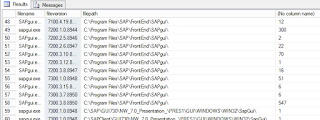
First, I needed to know how many versions of SAPGui.exe were out there, so a SQL query could do this:
Select sf.filename, sf.fileversion, sf.filepath, count(*)
from v_gs_softwarefile sf
where sf.filename = 'sapgui.exe'
group by sf.filename, sf.fileversion, sf.filepath
Returned:
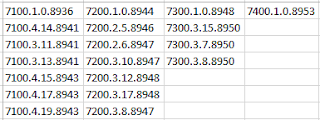
I am only concerned with the Program Files path exes, so I can now create my Collections with Queries:
(The reason for the 7200 and 7100 Collections is that they require a different Application in order to upgrade)
All Computers with Sagui.exe installed
select SMS_R_System.ResourceId, SMS_R_System.ResourceType, SMS_R_System.Name, SMS_R_System.
All Computers with the supported version 7300.3.15.8950 of Sapgui.exe installed
select SMS_R_System.ResourceId, SMS_R_System.ResourceType, SMS_R_System.Name, SMS_R_System.

I had quite a few attempts at using Asset Intelligence but Hardware Inventory wasn't giving me the right info. Instead, I turned to Software Inventory. Software Inventorying is notoriously slow/intensive and isn't really recommended save for specific reasons (e.g. see Sherry Kissinger's posts and blog) but it's enabled weekly for .exes only so it was already gathering the right stuff for me.
Props go Sherry Kissinger for her help with my TechNet post. She very kindly and gentl pointed out "You're doing it wrong"
First, I needed to know how many versions of SAPGui.exe were out there, so a SQL query could do this:
Select sf.filename, sf.fileversion, sf.filepath, count(*)
from v_gs_softwarefile sf
where sf.filename = 'sapgui.exe'
group by sf.filename, sf.fileversion, sf.filepath
Returned:

Copying those results out and into Excel, removing duplicates and separating into general versions gave me all versions out there:
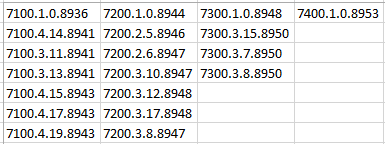
- All Computers with Sagui.exe installed
- All Computers with the supported version 7300.3.15.8950 of Sapgui.exe installed
- All Computers with version 7300 that aren't on the supported 7300.3.15.8950 installed
- All Computers with version 7400 installed (naughty!)
- All Computers with version 7200 installed
- All Computers with version 7100
(The reason for the 7200 and 7100 Collections is that they require a different Application in order to upgrade)
All Computers with Sagui.exe installed
select SMS_R_System.ResourceId, SMS_R_System.ResourceType, SMS_R_System.Name, SMS_R_System.
select SMS_R_System.ResourceId, SMS_R_System.ResourceType, SMS_R_System.Name, SMS_R_System.
All Computers with version 7300 that aren't on the supported 7300.3.15.8950 installed
Query 7300.1.0.8948
select SMS_R_System.ResourceId, SMS_R_System.ResourceType, SMS_R_System.Name, SMS_R_System.
Query 7300.3.7.8950
select SMS_R_System.ResourceId, SMS_R_System.ResourceType, SMS_R_System.Name, SMS_R_System.
And repeat changing the SMS_G_System_SoftwareFile.

Now I can include (or re-use) the relevant Collection(s) in my Software Deployment Collections, and my Business team will be happy bunnies.
Lessons learnt:
- Don't use Like!
- Use SQL to help get your query right
- Know what you are going to use the Collections for in the end
Friday, January 22, 2016
Amended SQL Report for 'Count operating systems and service packs' including architecture

Requirement was for OS versions/sp count but with added x86 or x64.
Taking Sherri Kissinger's findings and adding a join for addresswidth
oh, and if running as query to test then replace (@UserSIDs) with ('Disabled')
oh, and if running as query to test then replace (@UserSIDs) with ('Disabled')
SELECT OPSYS.Caption0 as C054, OPSYS.CSDVersion0,addresswidth0 as [x64/x86], COUNT(*) AS 'Count'
FROM fn_rbac_GS_OPERATING_SYSTEM(@UserSIDs) OPSYS
inner join fn_rbac_R_System(@UserSIDs) sys on OPSYS.ResourceID=sys.ResourceID join [v_GS_PROCESSOR] c on sys.ResourceID=c.ResourceID
GROUP BY OPSYS.Caption0, OPSYS.CSDVersion0,addresswidth0
ORDER BY OPSYS.Caption0, OPSYS.CSDVersion0
FROM fn_rbac_GS_OPERATING_SYSTEM(@UserSIDs) OPSYS
inner join fn_rbac_R_System(@UserSIDs) sys on OPSYS.ResourceID=sys.ResourceID join [v_GS_PROCESSOR] c on sys.ResourceID=c.ResourceID
GROUP BY OPSYS.Caption0, OPSYS.CSDVersion0,addresswidth0
ORDER BY OPSYS.Caption0, OPSYS.CSDVersion0

Tuesday, August 25, 2015

Monday, March 09, 2015
Two issues fixed by the same Hotfix:
- High CPU utilisation after installing the CM12R2 client
- Applications not appearing in Software Center despite meeting all requirements and not already being detected.
More on this.
WMI.
https://social.technet.microsoft.com/Forums/en-US/187c682a-f686-4885-aea0-436200e61eef/sccm-2012-agent-and-high-cpu-utilization?forum=configmanagergeneral
- Collection called Catalog1 uses a Query for OU memberships and returns all matching devices
- App-model applications are deployed as Available with requisite Detection methods to device Collections for that App i.e. App1 to Coll1, App2 to Coll2 etc.
- An Include query on each Collx of Catalog1 (meaning those devices also appear in Collx)
- Catalog1 is set to Incremental Update and Collx are set to update every hour (we are in test currently)
- An Include query on each Collx of Catalog1 (meaning those devices also appear in Collx)
- Catalog1 is set to Incremental Update and Collx are set to update every hour (we are in test currently)
So what happens is a machine with the client does not always show the 20-something applications in SC despite being in each collx. More stangely, sometimes only a couple of applications are listed despite meeting the apparent requirements (and not already being detected).
Wednesday, November 05, 2014
SCCM 2012 Subnet Boundaries. IDs and Subnet Masks: Thank YOU, Jason Sandys.
Recently, in my new SCCM 2012 environment a couple of W7 laptops started to display a worrying issue. The Config Manager client was not showing all the tabs, nor were there enough Policies and all the Components were listed as Installed but the necessary ones weren't enabled.


Every search on Google came back with Boundary (and Boundary Group) issues yet my logs (ClientLocation and and LocationServices) seemed to be saying all was well. Clearly something was wrong. It was late, I was stressed and worried. Then after many 'wrong links' I finally landed on the Oracle's page. He that shall be known as Jason Sandys. In one of his posts he talks about the Evil of Subnet IDs. In short the issues described in the post are exactly the issues I am facing: VLSM and thus overlapping boundaries.
So, without further ado, head on over to this post and drink your fill.
If you are suffering from strangeness with the client and resetting, re-installing or other fixes aren't working then you may well be in the same boat.
http://blog.configmgrftw.com/ip-subnet-boundaries-are-evil/
Every search on Google came back with Boundary (and Boundary Group) issues yet my logs (ClientLocation and and LocationServices) seemed to be saying all was well. Clearly something was wrong. It was late, I was stressed and worried. Then after many 'wrong links' I finally landed on the Oracle's page. He that shall be known as Jason Sandys. In one of his posts he talks about the Evil of Subnet IDs. In short the issues described in the post are exactly the issues I am facing: VLSM and thus overlapping boundaries.
So, without further ado, head on over to this post and drink your fill.
If you are suffering from strangeness with the client and resetting, re-installing or other fixes aren't working then you may well be in the same boat.
http://blog.configmgrftw.com/ip-subnet-boundaries-are-evil/
Subscribe to:
Posts (Atom)